File system types - Contiguous - O(1), blocks are in order and preallocated - Chained / Linked - O(n), blocks are effectively a linked list - Indexed - O(log(n)) / O(logk(n)), blocks are effectively in tables that point to other tables that point to the block - inode - O(logk(n)) where n = number of blocks, k = number of pointers per block
Chained allocation: If a file of 9 blocks uses chained allocation, on average it takes 5 () blocks to find and read. If it is on the 7th block, it will take 7 reads to get to that block.
Contiguous allocation: continuous in block (like continuous memory). If on the 50th block out of 100, will only take 50 blocks.
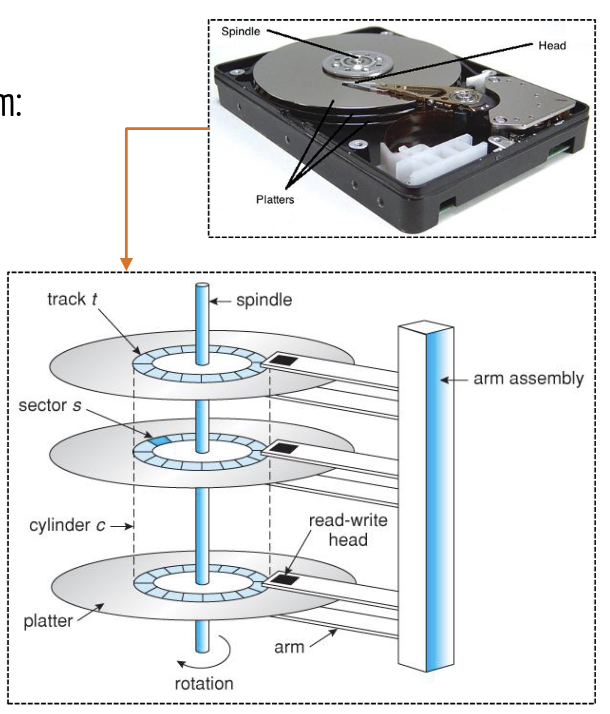
Physical hardware vs logical fs
Partition (divisions of the disk into independent sections that can hold filesystems) - logical
Platter (disk looking thing) - physical
Sectors (smallest physical unit of HD track - mostly 512 bytes)- physical
Block (smallest fixed size unit of storage used by FS’) - logical
Cluster (a group of sectors combined to optimise storage allocation) - logical
Track (concentric rings on the platter) - physical
Head (reads data from a platter) - physical
Cylinder (collection of all horizontal tracks on platters) - physical
Spindle (central rod that the disks, or platters, revolve around)- physical
Filesystem (defines how data is stored/named/retrieved, organises files and directories within a partition) - logical
 formatting
windows: open disk management → right click partition → format → choose file system → ok
linux: identify disk → umount disk /dev/sdX → format /dev/sdX → mount partition /dev/sdX /mnt
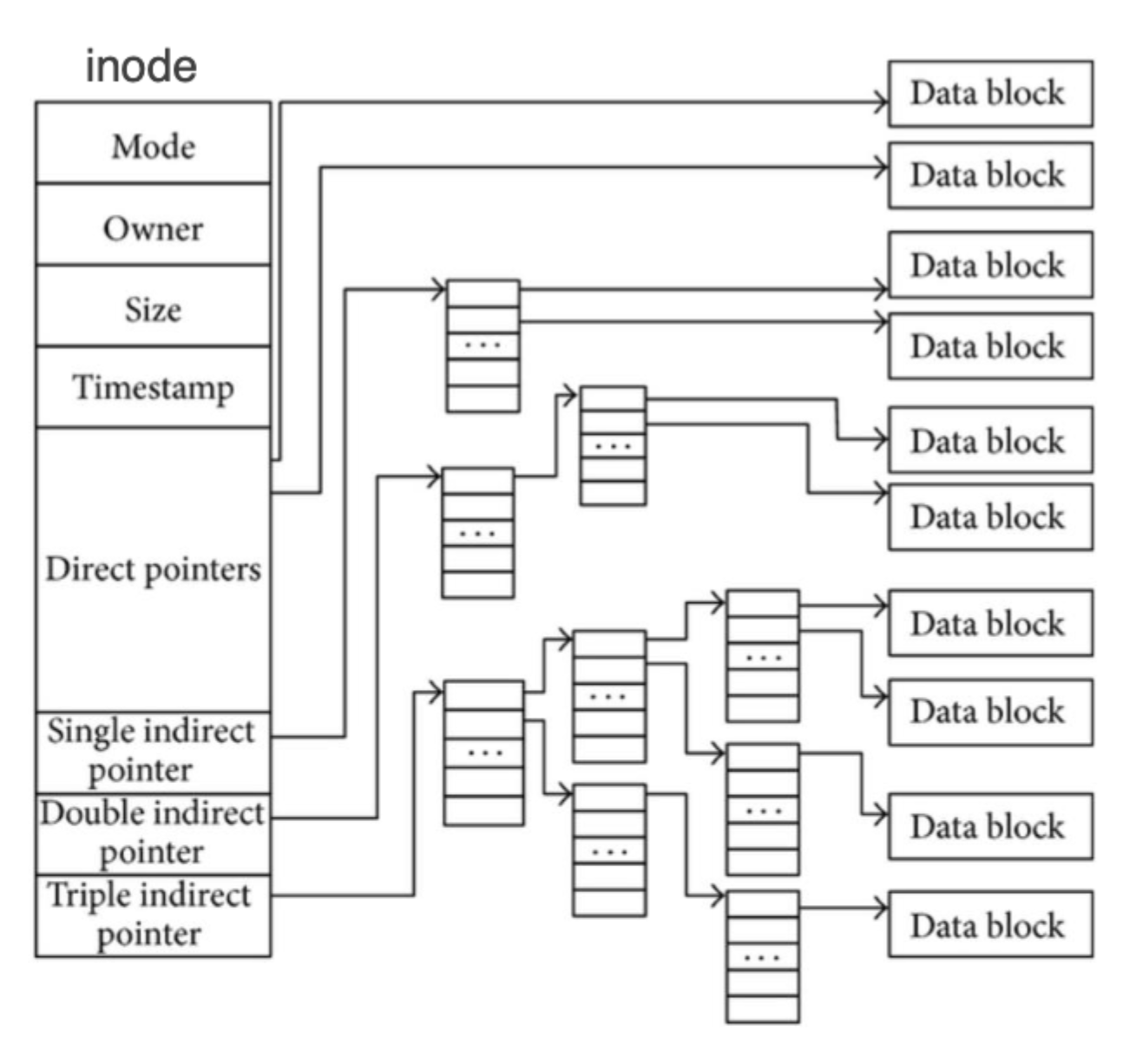
inode
has several fields:
formatting
windows: open disk management → right click partition → format → choose file system → ok
linux: identify disk → umount disk /dev/sdX → format /dev/sdX → mount partition /dev/sdX /mnt
inode
has several fields:
- file type - integer value / enum describing the file type (regular file, directory, symlink etc)
- permissions - specifies read/write/execute perms (4 read, 2 write, 1 execute)
- owner (uid)
- group (gid)
- size - the total size of file in bytes
- time stamps - created/modified/accessed
- link count - number of hard links pointing to the inode, reflects how many files reference the same inode
- pointers to data blocks (usually 15 pointers) - pointers to the data blocks where the file contents are stored
- first 12 - direct pointers, each containing physical address of a data block
- 13 - singly indirect, points to a block that contains pointers to a file block
- 14 - doubly indirect, contains two levels of single indirection
- 15 - triply indirect, contains three levels of single indirection
HTML Elements void elements
<area>
<base>
<br>
<col>
<embed>
<hr>
<img>
<input>
<link>
<meta>
<source>
<track>
<wbr>
css display
inline, block, inline-block, none, flex, grid
inline-block is the same as inline, except it allows you to define a height/width/margin/padding (which are otherwise ignored)
css position
static - ‘normal’ / default, no special positioning
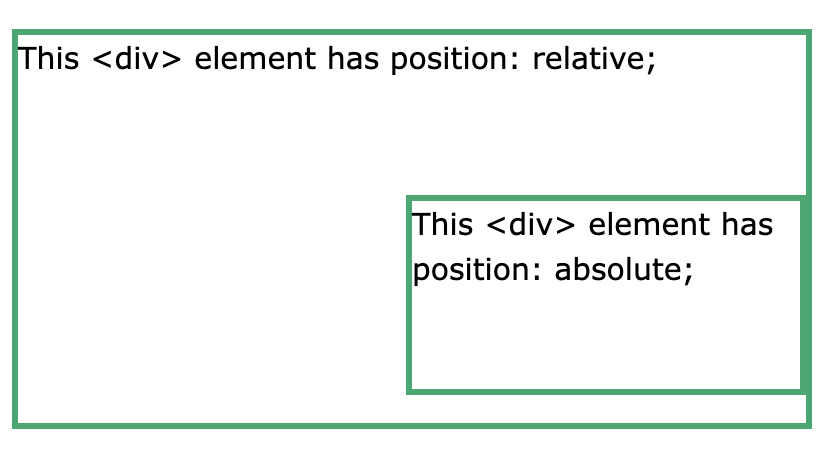
relative - position relative to the normal position (for example adding left: 30px will shift it 30px to the right from where it should’ve been)
fixed - positioned relative to the viewport, slapped right on top of the page
absolute - positioned relative the nearest positioned ancestor
 sticky - toggles between relative and fixed, depending on scroll position. must have top/right/bottom/left defined
security
| statement | type |
|---|---|
| Information is secured from everyone except yourself | none |
| Safeguard accuracy of information | integrity |
| Keep secrets from unauthorised users | confidentiality |
| Authenticate the user before showing them the information | confidentiality |
| Keep information flowing between authorised users | confidentiality, availability |
| Safeguarding information by cryptography | confidentiality, integrity |
| Information is allowed to flow to users when required | availability |
| Don’t allow information to be altered by unauthorised users | integrity |
| Allow access to information to authorised users | confidentiality, availability |
| Allow access to information to authenticated users | none |
- essential for CIA of data
- confidentiality - measures to ensure that data is private and protected
- who can access the data
- what are they authorised to do with their access
- how was the data accessed (location onsite/remote, protocol ssh/http, transmission path)
- where/when - what has been accessed (db, web server), the access timestamp
- integrity - measures to ensure that data is correct and authentic
- the data transferred is only altered by authorised users
- the data is secured/protected at rest and in transit
- data is verified at source and compared to destination (hashing, checksum
cksum) - data transfer trail is audited to ensure compliance with regulatory standards of data storage and data transfer (eg HIPAA U.S. Health Insurance Portability and Accountability Act of 1996, gdpr european union general data protection regulation, finra u.s. financial industry regulatory authority, pci dss Payment Card Industry Data Security Standard)
- availability - measure to manage user-access to data
- the degree of availability of data in the event of system failures (redundancy, backups)
- the authorization of user access from validated locations (IP addr etc)
- degree of ssystems resilience for cyber-attacks while maintaining functional operations
- DoS - flood traffic
- Phishing - tricking individuals into revealing sensitive information by posing as a trustworthy entity
- MITM - coffee shop fake WiFi hotspot example
- SQL Injection - locate vulnerable input (login form/search bar/url parameter etc), inject malicious code
' OR '1'='1, security breached, obtain access
- confidentiality - measures to ensure that data is private and protected
- types of security
- physical sec - securing physical assets (servers, buildings, hardware etc) with locks/surveillance/controlled access
- system sec - protects computer systems and software from threats like malware, unauthorized access, data breaches etc
- network sec - secures network infrastructure by preventing unauthorized access, misuse, or attacks through firewalls, vpns and encryption (transit)
- data sec - safeguards sensitive data from theft, corruption, or unauthorized access by using encryption (at rest), backups and secure storage methods
- software sec - focuses on identifying and fixing vulnerabilities in software to prevent exploits such as injection attacks or buffer overflows
- access management - controls/manages who has access to systems and data, using tools like authentication, authorization and auditing
- security lifecycle:
- prevention
- physical sec - protection of personnel, hardware, software and data from physical threats. preventions include credential control (keycards/biometrics/pin codes), physical barriers (gate/doors/turnstiles), monitoring (guards, cameras, alarm sensors), tailgating/piggybacking
- network sec - protection of data and ensuring the integrity, availability, and confidentiality of data as it moves across/interacts with a network. preventions include firewalls (block unauthorized traffic, allow legitimate comms), intrusion detection/prevention systems (IDS/IPS), VPNs, segmentation (subnetting, VLANs)
- system sec - safeguarding individual devices/systems from unauthorized access, cyberattacks, and vulnerabilities to ensure the CIA of data. preventions include system hardening (disable unnecessary services/processes + configure secure settings), antivirus/anti-malware, patching and updates, backup solutions
- software sec - protecting software applications from vulnerabilities and attacks throughout software development lifecycle and ensures that software is developed, maintained, and deployed securely. prevention includes secure coding practices, static and dynamic analysis, regular security testing (reg. pentesting and vulnerability assessments), patch management (apply updates and fixes)
- data sec - unauthorized access, corruption or theft throughout its lifecycle to ensure the CIA of information. prevention includes encryption (methods include symmetric/asymmetric/hybrid (see image)), hashing/checksums (
cksum), masking (hide sensitive information by replacing it with altered values to prevent exposure during dev/testing. techniques like substitution, shuffling, redacting, and nulling out), auditing (conduct assessments to ensure compliance with data security policies and identify vulnerabilities; can be conducted internally or by a 3rd-party / independent auditor)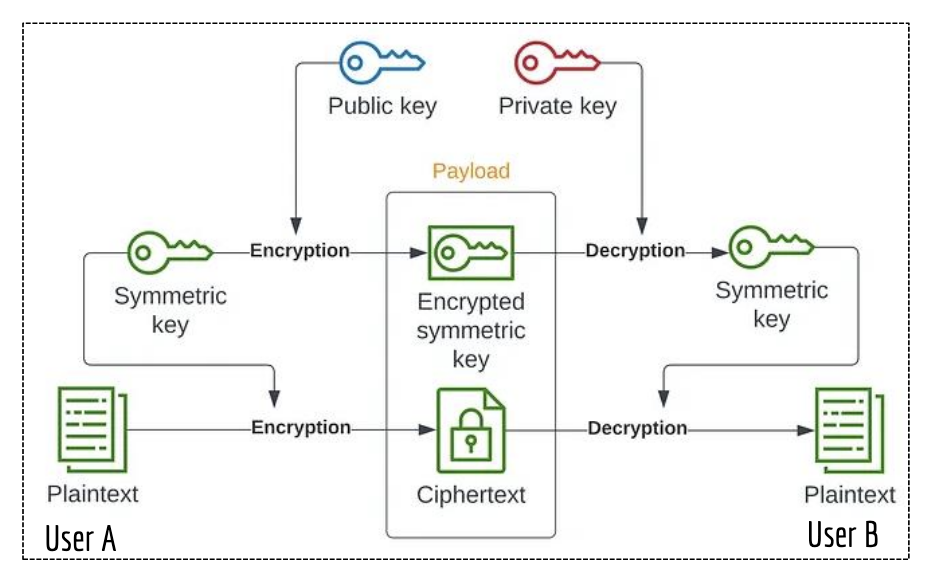
- access management - controlling who has access to resources, data, or systems in an organisation. preventions include authentication, authorization, accountability (tracking and auditing user activities using monitoring/logging systems), identification (determining the identity of users access the system/resources/data)
- authentication → best determined by something you know (password/pin), something you have (keys/USB/smart card/certificate/token/virtual card), something you are (biometrics)
- authorization → rbac (role based access control - assigned a role with permissions), abac (attribute bac - access based on user attributes/resource/context, ie HR can access employee records during work hours), dac (discretionary ac - resource owner determines who can read/write), pbac (policy bac - policies such as employees can access certain documents remotely based on security policies)
- accountability → system auditing (check software/hardware/configurations and detect anomalies/weaknesses), access auditing (monitor who has access to what resources and tracks user actions within the system), compliance auditing (ensures that the organisation complies to regulations/standards such as gdpr, hipaa, pci dss), operational auditing (efficiency or effectiveness of operational procedures, ensuring they align with organisational goals)
- identification → processes/technologies used to manage digital identities and control user access to resources; encompasses creation/maintenance/deletion of user accounts, as well as ensuring individuals have appropriatet access. prevention includes user provisioning (process of creating/managing/deleting user accounts), identity governance (policies and procedures for managing identities to ensure compliance), group management (easier management of permissions and access rights, streamlining the administration of access controls), federated users (identities that span multiple domains/organisations, allowing users to access without needing separate credentials; SSO)
- identity management in unix:
useradd -m newuser,passwd newuser,groupadd developers,sudo usermod -aG developers newuser,id newuser(shows uid + gid),groups newuser(shows groups),userdel -r newuser,groupdel developers - permission management in unix:
chmod <entity><operator><permission> file(u/g/o, +/-/=, r/w/x), or numerical method
- detection
- signature-based detection (compare activities against known database of attack signatures, eg antivirus), anomaly-based detection (ids), heuristic-based detection (rules and algs to identify suspicious activities based on behaviour patterns), behavioural detection (monitors user or system behaviour to flag irregularities that may indicate an attack)
- response
- immediate actions taken after detecting a security threat/incident to eradicate/contain/mitigate/recover from its effects, and to learn through analysis and improve. goal is to minimise damage and restore normal ops as quickly as possible
- response process outlined in response plan. response plan outlines predefined actions and procedures that an organisation should follow when responding to a security incident
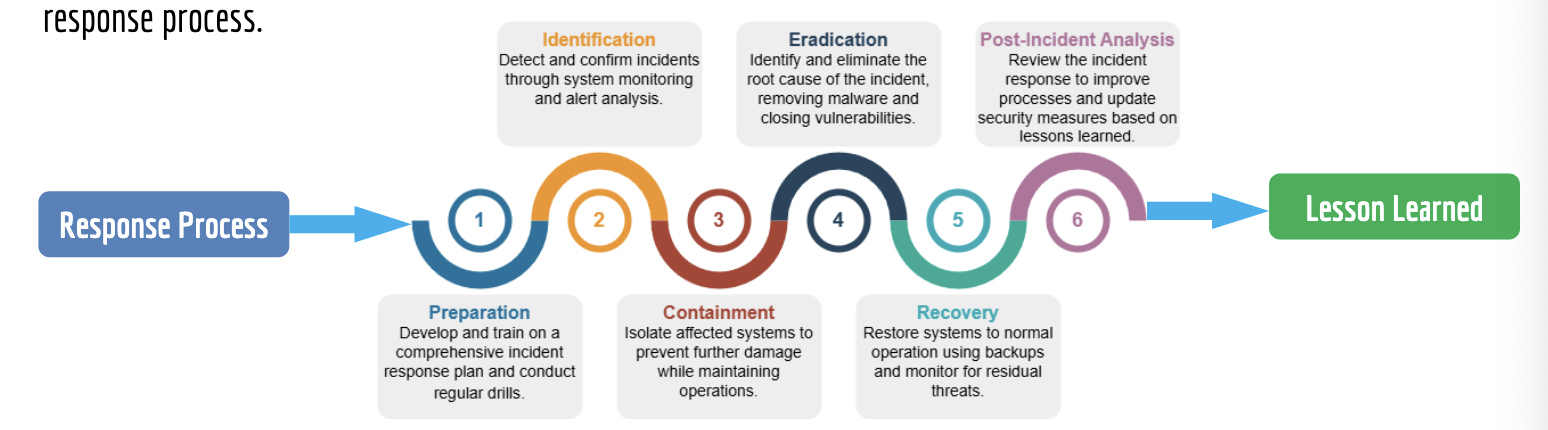
- recover
- processes and actions taken to restore systems and operations to normal following an incident. effective recovery is crucial to minimising downtime and ensuring business operations can resume securely and efficiently
- business continuity plan (bcp) - focuses on maintaining and restoring essential functions during and after a crisis; ensure that the org can continue operating amidst disruptions; outlines different disaster scenarios and what the business will do to keep business running as usual
- disaster recovery plan (drp) - subset of bcp, specifically addresses the recovery of IT systems; detailed roadmap for restoring business functionalities with min. threat impact; follow-on steps to learn/adapt/prevent disaster from happening again
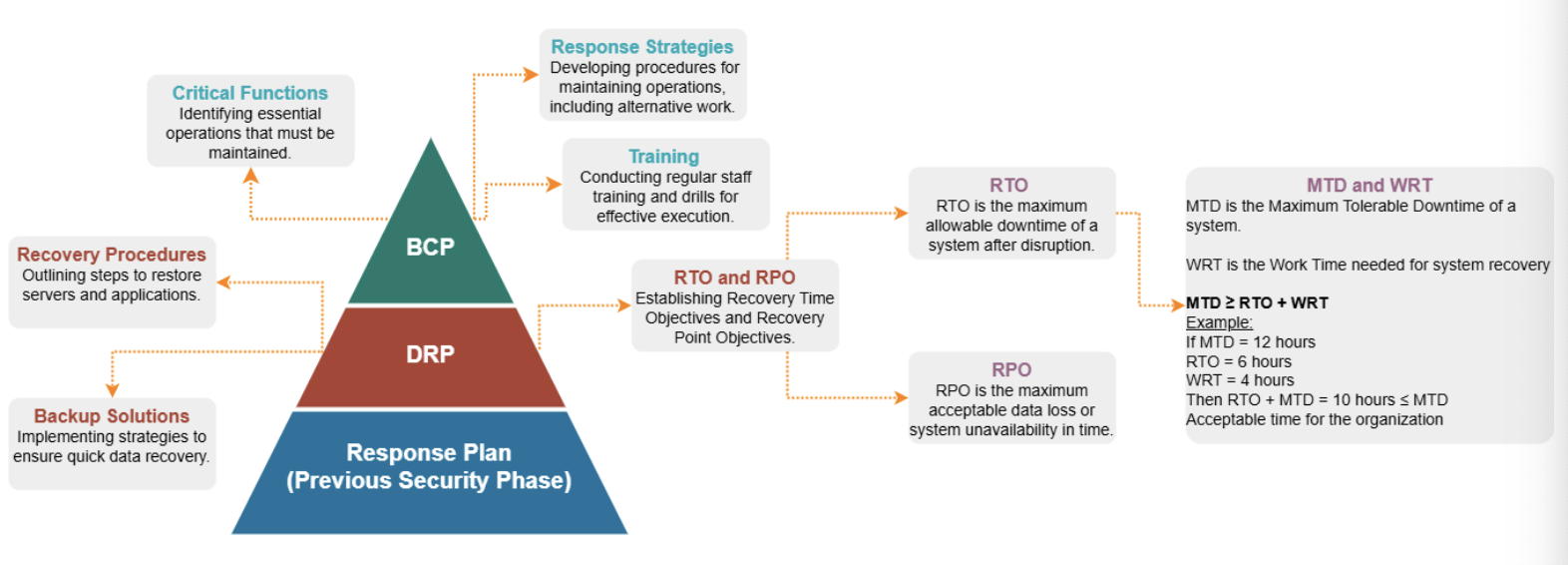
- review
- incident review - analyse incidents and investigate monitoring logs to reveal weaknesses in security
- policy evaluation - assess security policies and procedures to ensure they remain effective and relevant
- auditing - regular security audits can reveal compliance issues or weaknesses in existing controls
- reporting - document findings, updates, and recommendations for future reference and compliance
- improve
- assessment of findings - evaluate insights and feedback gathered from the review phase to identify specific areas needing enhancement
- implementation of changes - apply necessary changes to policies, procedures, or technologies based on the identified needs
- training and awareness - conduct training and awareness programs for staff to ensure they are informed about new policies, tools and security practices
- monitoring and evaluation - continuously monitor the effectiveness of the implemented changes and make further adjustments as needed
- documentation and reporting - document all changes made during the improve phase and communicate them to relevant stakeholders security best practices:
- prevention
- implement AAA - strong authentication mechanisms, implement rbac for authorization, maintain detailed logs for accounting to track user activities
- review access permissions - periodic audits of user access rights to ensure that they align with current responsibilities. remove / modify access for users who no longer require it
- monitor user activity - employ monitoring tools to detect suspicious behaviour or unauthorized access attempts and implement account lockout mechanism
- principle of least privileges - grant users the minimum level of access necessary for their roles. limits exposure to sensitive information and reduces the potential damage from compromised accounts
- strong password policies - enforce the use of complex passwords and require regular updates. consider implementing password managers to help users manage their credentials securely
- secure remote access - use vpns and other secure methods (jumphosts) to allow remote access to sensitive systems. ensure that remote access is tightly controlled and monitored